Simple Google Apps Launcher (EN/JP)
ChromeのツールバーからGoogle各種サービスへ瞬時にアクセスできる、軽量でカスタマイズ性に優れたGoogleアプリランチャー拡張機能です。
[EN] Simple Google Apps Launcher is a lightweight, customizable Chrome extension that allows you to instantly access all your favorite Google Workspace tools and services directly from your toolbar or with a quick keyboard shortcut.
[JP] Simple Google Apps Launcherは、ChromeのツールバーやショートカットキーからGoogleの各種サービスへ瞬時にアクセスできる、軽量でカスタマイズ性に優れたChrome拡張機能です。
Key Features
1-Click & Shortcut Launch
 [EN]
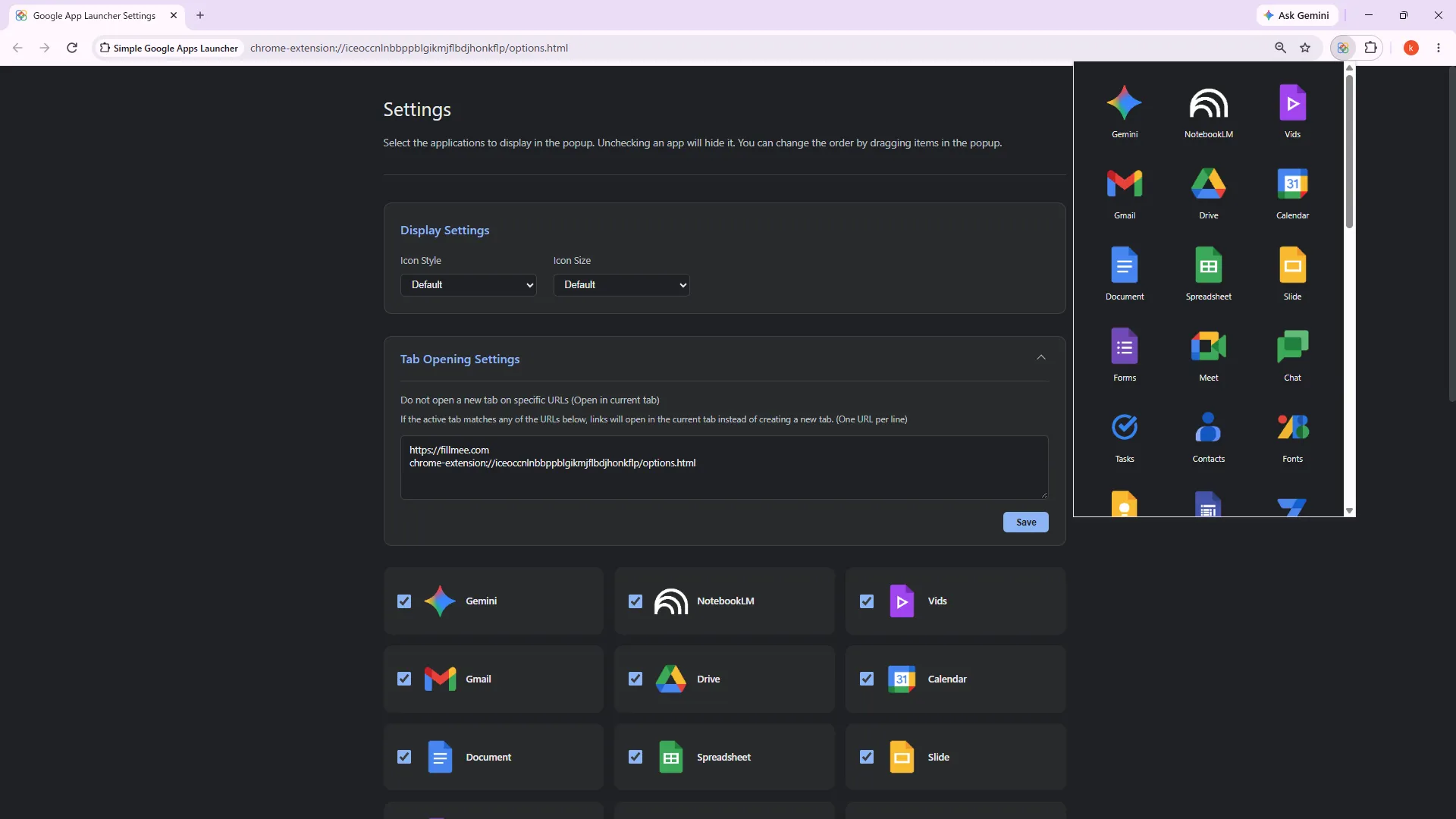
Launch instantly with a single click from the toolbar icon or with a customizable keyboard shortcut (Win:
Alt + L).
Keyboard shortcuts can be customized via Chrome > Extensions > Manage Extensions > Shortcuts.
[JP]
ツールバーのアイコンクリックやショートカットキー(Win:Alt + L)から瞬時にランチャーを呼び出せます。
ショートカットキーはChromeブラウザ > 拡張機能 > 拡張機能の管理 > ショートカット から変更できます。
Drag & Drop Reordering
 [EN]
Intuitively customize the display order of apps via drag-and-drop to place your most frequently used services right at the top. A quick reset button is also available.
[JP] 直感的なドラッグ&ドロップ操作でアプリアイコンを自由に並び替えられます。ワンクリックで初期並び順に戻せるリセット機能も完備しています。
Settings
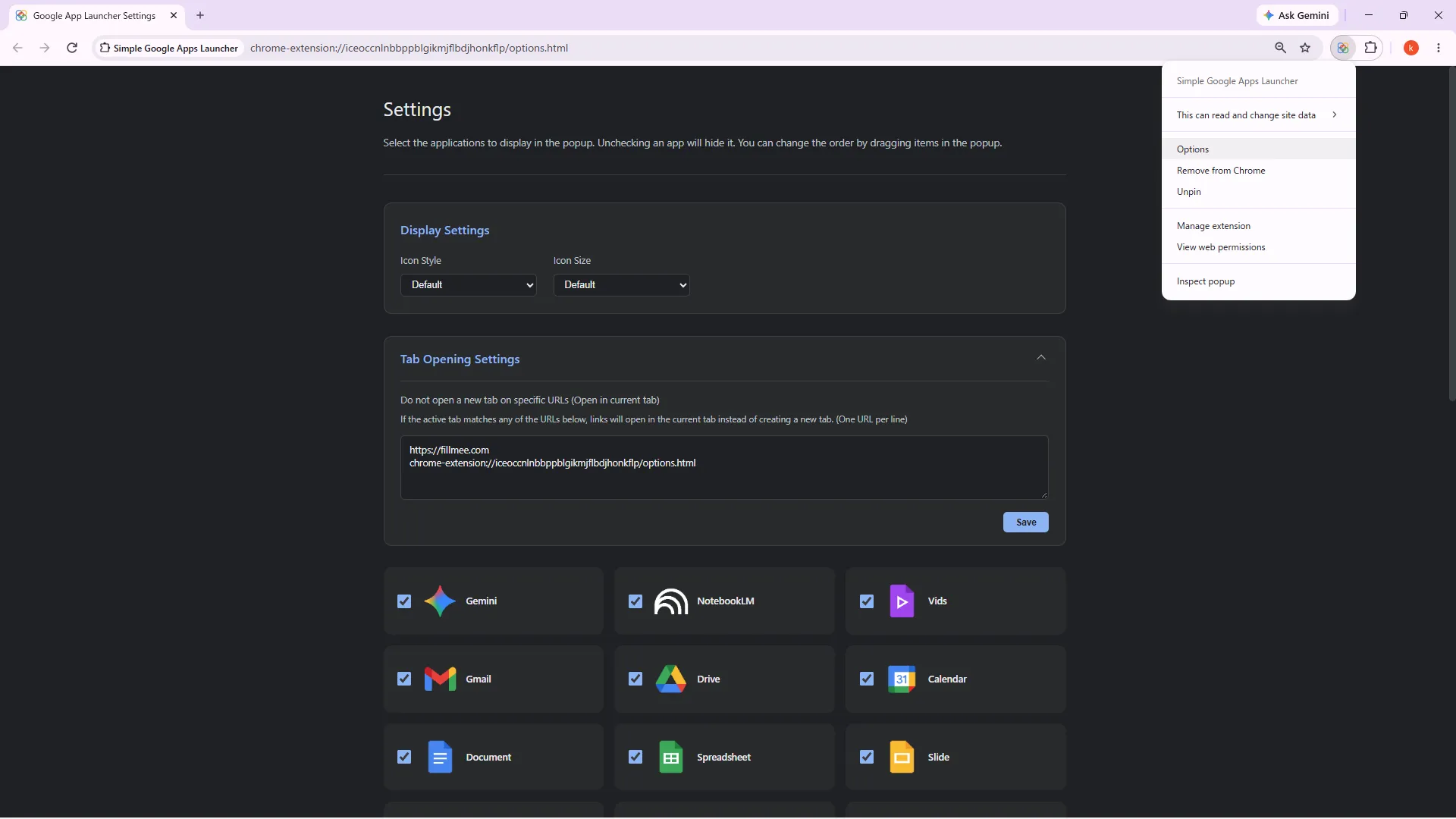
[EN] Settings can be opened by right-clicking the extension icon > Options. [JP] Settingsはアイコン > 右クリック > Options でひらくことができます。
Customizable Themes & Sizes
[EN] Choose between two distinct visual themes (Standard and Dot) and two icon size options (Normal and Small) to match your workflow and aesthetic preferences.
[JP] 2種類のテーマ(標準/ドット)と2段階のアイコンサイズ(標準/小)を自由に切り替えられ、作業環境に合わせた最適なレイアウトを選択できます。
App Visibility Filtering
[EN] Easily show or hide specific services in the options settings, keeping your launcher clean, clutter-free, and focused only on the apps you actually use.
[JP] 使わないアプリはオプション画面で手軽に非表示に設定可能。不要なアイコンを隠してミニマルでスッキリとした画面を維持できます。
Smart Tab Opening & Custom Blank Tab URLs
[EN] When opening a service, the extension intelligently reuses the current tab if it is empty (New Tab page) to avoid tab clutter. You can also specify custom URLs (e.g., internal company portals) to be treated as blank tabs for reuse.
[JP] アプリ起動時、現在開いているタブが新規タブ(空タブ)の場合はそのタブを再利用して開き、作業中のタブはそのまま保持して新規タブで開きます。また、社内ポータルなど特定のURLも再利用対象として設定可能です。
Target Audience & Use Cases
[EN]
| Target Audience | Key Use Cases & Benefits |
|---|---|
| Heavy Google Workspace Users | Streamlines daily workflows by eliminating repetitive bookmark searching and URL typing for Gmail, Drive, Docs, Calendar, and Gemini. |
| Minimalist Professionals & Developers | Keeps browser toolbars and bookmark bars clean and clutter-free while maintaining one-key rapid access. |
| Efficiency Seekers | Prevents tab overload through intelligent empty-tab reuse and custom launch rules. |
[JP]
| おすすめするユーザー | 主な利用シーン・メリット |
|---|---|
| Googleサービスを日常的に使う方 | Gmail、Drive、Docs、カレンダー、Geminiなど、頻繁に利用するサービスへ迷わず1ステップで素早くアクセスできます。 |
| ブックマークバーを整理したい方 | ブックマークバーをアイコンで埋め尽くすことなく、ミニマルで洗練されたブラウザ環境を実現します。 |
| タブが増えがちな方 | 空タブのスマート再利用や特定URL設定により、無駄な新規タブの乱立を防ぎ快適に作業を継続できます。 |
Privacy & Security
[EN]
- 100% Local Storage: All customization preferences, icon order, and visibility settings are stored exclusively in your local browser (
chrome.storage.local). - Zero External Communication: Completely offline-capable. No analytics, tracking scripts, or data collection of any kind.
- Minimal Permission Design: Uses
activeTabonly on user interaction to inspect blank tabs in memory without accessing browsing history.
[JP]
- 完全ローカル完結: アイコンの並び順や表示設定は、すべてブラウザ内(
chrome.storage.local)にのみ安全に保存されます。 - 外部通信ゼロ: 外部サーバーへの通信、広告トラッキング、アクセス解析スクリプトは一切含まれません。
- 最小限の権限設計: クリック時の一時的な空タブ判定にのみ
activeTabを使用し、閲覧履歴の取得を行わない安全な設計です。
Disclaimer
[EN]
- Feature Rollout & Updates: Newly introduced features may experience a temporary delay before becoming available on your browser due to Chrome Web Store review and rollout schedules. Please ensure your extension is updated to the latest version.
- Data Persistence: Settings are saved locally, but may be lost due to browser cache clearing, device resets, or extension uninstallation.
- No Affiliation: Simple Google Apps Launcher is an independent extension and is not affiliated with, endorsed by, or sponsored by Google LLC.
- No Liability: The developer assumes no responsibility for any data loss, direct, indirect, or consequential damages resulting from the use of the Extension.
[JP]
- 最新機能の配信について: 新しく追加された機能は、Chromeウェブストアの審査や配信状況により、お手元のブラウザに反映されるまで多少のタイムラグが生じる場合があります。拡張機能が最新版に更新されていることをご確認ください。
- データの保持: 設定はローカル保存されますが、キャッシュ削除やブラウザの再インストール等で初期化される可能性があります。
- 非公式ツール: 本拡張機能は個人開発のツールであり、Google LLC との提携、承認、スポンサーシップ等の関係はありません。
- 免責: 本ツールの利用に伴うデータの損失や損害について、開発者は一切の責任を負いません。
Support
[EN] For inquiries and support, please use the support form at the bottom of the extension’s product page.
[JP] サポートは本拡張機能のプロダクトページ最下部のサポートフォームからお問い合わせください。
関連するポリシー
この内容に関連するポリシーをご確認ください。
各リンクは新しいタブで開きます。
 Support
Contact Us
Please review our Privacy Policy (open in a new tab) before submitting an inquiry.
(事前に 個人情報保護方針をご確認の上、お問い合わせください。)