File Manager Pro (EN/JP)
Intuitive and Secure Browser-Based File Manager / 直感的かつ安全なブラウザ上ファイルマネージャー
[EN] File Manager Pro is a Chrome extension specialized in manipulating, organizing, and cleaning up filenames directly within your browser. Even when you need to rename large batches of files—such as preparing them for cold storage archiving—there is no need to write Python scripts or prompt an AI. With intuitive controls, you can perform bulk filename operations safely and quickly.
[JP] File Manager Proは、ローカルディレクトリ内のファイル名操作(一括リネーム・整形)をブラウザ上から直感的かつ安全に行えるChrome拡張機能です。データのクレンジングやコールドデータへの移行に伴うまとまったファイル名の変更も、Pythonスクリプトを書いたりAIを使ったりする必要はなく、ブラウザ上の操作だけで手軽に完結します。
Key Features
Batch Renaming & Numbering / 安全な一括リネーム・連番付与
[EN]
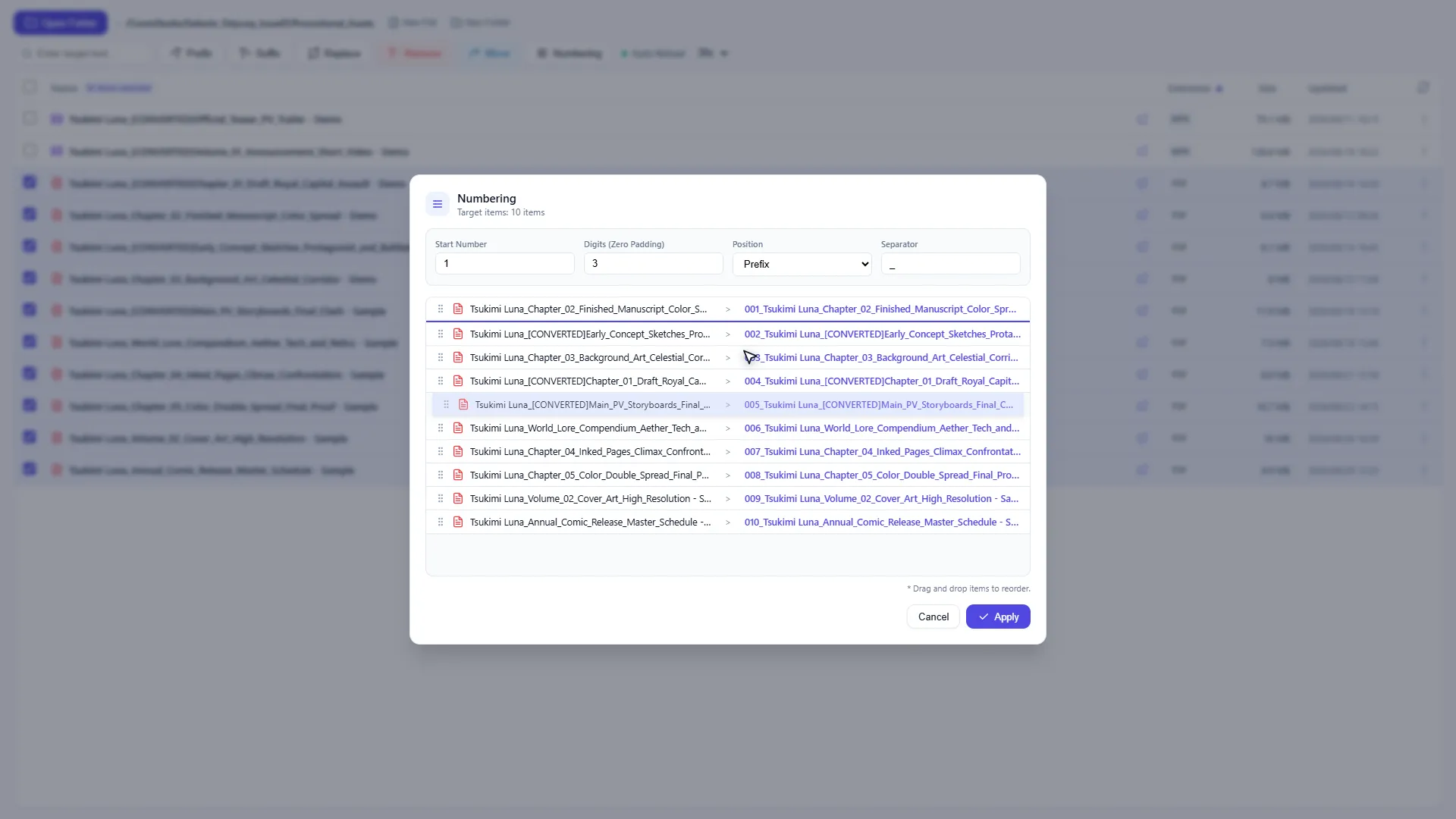
- Sequential Numbering: Freely reorder selected files via drag-and-drop and add sequential numbers of your choice.
- Prefix & Suffix Addition: Add custom prefixes (
+T) or suffixes (T+) in one click. - String Replace & Remove: Batch replace or remove specific tags/strings (
T-) .
[JP]
- 連番の一括付与(Numbering): 選択した複数ファイルをドラッグ・ドロップで自由に並べ替え、任意の連続する番号を付与することができます。
- Prefix / Suffixの一括追加: ファイル名の先頭(
+T)や末尾(T+)に任意の文字列を一括追加。 - 文字列の一括置換・除去: 不要なタグや文字列の一括除去(
T-)や置換に対応。
Automatically protect file extensions. / 拡張子の変更はできません。
Demonstration
Watch full batch file renaming, replacement & numbering in 40 seconds.
Shortcut-Keys
SHIFT + CLICK : Select Range / 範囲選択
Smart Directory Skipping / 肥大化しやすいフォルダのスキップ
[EN] Automatically skips heavy directories(node_modules,.git,.venv) to maintain lightning-fast response times.
[JP] 肥大化しやすいフォルダ(node_modules,.git,.venv)はスキップし、フリーズを防止します。
Browser-Native Preview / ブラウザ内プレビュー機能
[EN] Preview images, PDFs, audio, and videos directly in a separate browser tab without launching external applications.
[JP] 画像、PDF、音声・動画などブラウザ対応形式は別タブでプレビュー。
Responsive UI for Split Screens / 画面分割に最適化されたレスポンシブUI
[EN] Optimized for split-screen display. Even when used side by side with browser tools like Google Colab, the layout remains intact without interrupting your workflow or analysis.
[JP] 画面分割表示に対応しています。Google Colabなどのブラウザツールと並べて作業してもレイアウトが崩れず、分析や作業の流れを止めません。
Target Audience & Use Cases
[EN]
| Recommended Users | Key Use Cases & Benefits |
|---|---|
| Data Scientists | Numbering and cleanse image datasets. |
| Creators | Batch organize asset images, standardize naming conventions. |
| Systems Engineers | Organize past logs and system dumps before archiving, and standardize naming conventions. |
| Archive Managers | Batch rename long-term project documents and audit trail records by year and version. |
| Back-Office Staff | Organize electronic books/records to designated storage based on statutory retention periods. |
[JP]
| おすすめするユーザー | 主な利用シーン・メリット |
|---|---|
| データサイエンティスト | 画像データセットの連番付与やクレンジング |
| クリエイター | アセット画像の一括整理・命名規則の統一 |
| システムエンジニア | 過去ログやシステムダンプのアーカイブ前整理、命名規則の統一 |
| アーカイブ管理者 | 長期保管する過去案件資料・証跡データの年別・版番への一括リネーム |
| バックオフィス | 法定保存期間に基づく電子帳簿の整理 |
Privacy & Security
[EN]
- 100% Local Processing: Operates entirely within your local browser environment using the standard
File System Access API. - Zero External Communication: Completely offline-capable. No analytics, tracking scripts, or server transmissions.
- Accidental Deletion Protection: Entire folder deletion is strictly disabled to prevent disastrous data loss, and individual file deletions require explicit confirmation.
[JP]
- 完全ローカル完結: ブラウザ標準の
File System Access APIを活用し、すべての処理をローカル環境内でのみ実行します。 - 外部通信ゼロ: 外部サーバーへのデータ送信、トラッキング、アクセス解析は一切含まれません。オフライン環境でも完全動作します。
- 誤操作防止プロテクト: 誤操作による致命的なデータ消失を防ぐため、フォルダ全体の削除を完全禁止化。個別ファイル削除時も明確な警告を表示します。
Disclaimer
[EN]
- Data Persistence: File operations (renaming, moving, deleting) are directly applied to local files per your explicit instructions.
- Backup: Always keep backups of critical files before performing large batch operations.
- No Liability: The developer assumes no responsibility for any data loss or damages resulting from the use of this tool.
[JP]
- データの保持: ファイルの変更・移動・削除はユーザーの明示的な指示に基づいてローカルファイルに直接反映されます。
- バックアップ: 大規模な一括操作を行う前に、重要なファイルは必ず事前にバックアップを作成してください。
- 免責: 本ツールの利用に伴うデータの損失や損害について、開発者は一切の責任を負いません。
Support
[EN] If you have any questions, feedback, or inquiries regarding this Privacy Policy or the Extension’s privacy practices, please contact us using the dedicated contact form located at the bottom of this page.
[JP] 本プライバシーポリシーまたは本拡張機能におけるプライバシーの取り扱いに関するご質問・ご意見は、本ページ最下部の専用フォームよりお問い合わせください。
関連するポリシー
この内容に関連するポリシーをご確認ください。
各リンクは新しいタブで開きます。
 Support
Contact Us
Please review our Privacy Policy (open in a new tab) before submitting an inquiry.
(事前に 個人情報保護方針をご確認の上、お問い合わせください。)